
GitHub Enterprise lists at $21 per user per month. That number is real, and it is also the smallest line on most enterprise invoices.
The seat price has not moved in 2026. Almost everything attached to it has. Hosted runner rates were cut on 1 January, Copilot moved to usage-based billing on 1 June, and three further changes land between now and 1 October, the first of them on 1 September. If you built your budget on an invoice from earlier this year, the arithmetic underneath it has already changed.
This is a breakdown of what GitHub Enterprise costs once every meter is counted: what the seat buys, what it does not, and what a 50-developer organisation actually pays.
Every rate below was checked against GitHub's own pages on 29 August 2026. GitHub changes them often, so treat any figure here as a starting point for your own billing page rather than a fixed quantity.
Key Takeaways
- GitHub advertises Team at $4 and Enterprise "starting at $21" per user per month, both marked for the first 12 months. GitHub does not publish what you pay in year two.
- On 1 September 2026 the transitional Copilot credit allowance ends. Included usage falls from $30 to $19 per Business seat and from $70 to $39 per Enterprise seat, with no change in price.
- Secret Protection and Code Security together list at $49 per active committer per month, more than double the platform seat. In the model below they are the largest single line, larger than all the seats combined.
- Organisation and enterprise plans include no free Codespaces quota at all, while a free personal account gets 120 core-hours and 15 GB a month.
- Modelled on GitHub's own list rates, a 50-developer organisation lands near $106 per developer per month. The seat is about a fifth of that.
In this article:
- What does GitHub Enterprise actually cost per user in 2026?
- GHEC vs GHES: does the deployment model change the price?
- Which costs are not in the seat price?
- What does a 50-developer organisation really pay?
- Where do the bills surprise people?
- When is Team enough, and when do you need Enterprise?
- Frequently Asked Questions
- What to do before your next invoice
What does GitHub Enterprise actually cost per user in 2026?
The public list price is $21 per user per month, and the wording around it matters. GitHub's pricing page renders Enterprise as "Starting at $21 USD per user/month" and Team as "$4 USD per user/month", with both carrying an asterisk reading for the first 12 months (GitHub Pricing).
Two qualifiers are doing real work there. "Starting at" signals that Enterprise is sales-negotiated above some volume, so $21 is a floor rather than a rate. And the twelve-month marker implies a different renewal price that GitHub does not publish anywhere I could find on a page it controls. Third-party sites quote year-two figures; none of them cite a GitHub source. Budget for a renewal conversation you cannot price in advance, and put it in the procurement calendar at month nine.
What the seat does buy is a much larger allowance envelope:
| Free | Team | Enterprise Cloud | |
|---|---|---|---|
| Price, per user/month | $0 | $4 | from $21 |
| Actions minutes, per account/month | 2,000 | 3,000 | 50,000 |
| Artifact and Packages storage, per account | 500 MB | 2 GB | 50 GB |
| Packages data transfer, per account/month | 1 GB | 10 GB | 100 GB |
| Git LFS storage and bandwidth, per account | 10 GiB | 250 GiB | 250 GiB |
Sources: GitHub Pricing and GitHub Docs on Git LFS billing.
Enterprise costs 5.25 times what Team costs and includes 16.7 times the Actions minutes and 25 times the storage. That is a genuine argument in GitHub's favour, and it is the reason the seat price alone tells you so little: the plan you choose sets the size of the allowances, and the bill is decided by how far past them you run.
One caveat on that table. GitHub's pricing page still advertises Git LFS as "$5 per month for 50 GB bandwidth and 50 GB of storage", which is the retired pre-paid data pack. The documentation is explicit that "these have been removed and replaced with metered billing and you only pay for what you actually use" (GitHub Docs). When the marketing page and the billing documentation disagree, price from the documentation.
GHEC vs GHES: does the deployment model change the price?
No. GitHub Enterprise Cloud (GHEC) and GitHub Enterprise Server (GHES) are two deployment models of a single plan that entitles you to both, and a person consumes one seat regardless of how many places they use it. The documentation states that "with the GitHub Enterprise plan, you're entitled to use both GitHub Enterprise Cloud and GitHub Enterprise Server", and that "each user only consumes one license, no matter how many GitHub Enterprise Server instances the user uses, or how many organizations the user is a member of on your GitHub Enterprise Cloud deployment" (GitHub Docs).
Enterprise Server, in other words, is an entitlement of the plan rather than a separately priced product. There is no GHES list price to compare against GHEC.
The cost risk here is not the rate. It is deduplication, and it is opt-in. GitHub is explicit that "for a person using multiple GitHub Enterprise environments to only consume a single license, you must synchronize license usage between environments", after which "GitHub will deduplicate users based on the email addresses associated with their user accounts" (GitHub Docs). The matching only happens if you set the synchronisation up. Skip the sync and the same engineer is counted twice: once on the appliance, once in the cloud, at full rate. In an organisation running several Server instances alongside Cloud, that is a recurring overcharge nobody notices, because both numbers look plausible in isolation.
Two licensing models exist and they behave differently:
| Model | How it works | Watch for |
|---|---|---|
| GitHub Enterprise (usage-based) | Cloud-first. Users are assigned in a Cloud organisation; Server rights follow. Users self-generate a Server licence valid for one year. | Annual licence regeneration is a calendar item, not an automatic renewal |
| GitHub Enterprise Unified (volume or subscription) | A single bundled licence covering both Cloud and Server | Set up through GitHub Sales, so the terms are the negotiated ones, not the published ones |
Source: GitHub Docs, combined enterprise use.
The same discipline that governs multi-account cloud estates applies here. If you have ever untangled duplicated identities across an AWS Control Tower landing zone, the failure mode is familiar: the platform will happily bill twice for one human until someone reconciles the directories.
Which costs are not in the seat price?
Nearly everything that makes GitHub useful at enterprise scale. The seat buys the platform and the allowances in the table above. These are billed separately.
Copilot is never bundled. No GitHub Enterprise plan includes any Copilot tier. Copilot Business is $19 per user per month and Copilot Enterprise is $39 per user per month, each additive to the platform seat (GitHub Blog). A GitHub Enterprise seat with Copilot Enterprise attached is $60 per user per month before a single minute of compute.
Security is a separate purchase, and it is the expensive one. GitHub Advanced Security was split into two products on 1 April 2025. Secret Protection lists at $19 per month per active committer and Code Security at $30 per month per active committer (GitHub Changelog, 4 March 2025). Running both is $49 per active committer per month, which for most organisations is more than double the platform seat. It also means your security bill is counted on a different basis than your seat bill, so the two numbers on your invoice will never match.
Compute is metered per minute, and the spread is wide. GitHub now publishes direct per-minute dollar rates per runner SKU rather than the old minute-multiplier system:
macOS runs at $0.062 per minute against $0.006 for a standard Linux runner, roughly a ten-fold difference, and 31 times the $0.002 one-core Linux SKU. ARM is consistently cheaper than x64 at the same core count, $0.005 against $0.006 at two cores, and the absolute gap widens with size: $0.008 against $0.012 at four cores, and $0.098 against $0.162 at 64. Moving a CI matrix from x64 to ARM is one of the few cost levers on this page that costs nothing to pull (GitHub Docs).
Storage and transfer are metered too, at $0.25 per GB per month for shared Actions and Packages storage, $0.50 per GB for Packages data transfer, $0.07 per GB per month for Actions cache and Git LFS storage, and $0.0875 per GiB for LFS bandwidth (GitHub Pricing Calculator).
Codespaces is metered from the first hour on an organisation plan. Compute runs from $0.18 per hour for a two-core machine to $2.88 for 32 cores, with storage at $0.07 per GB-month (GitHub Docs). Why there is nothing to draw on first is covered below.
What does a 50-developer organisation really pay?
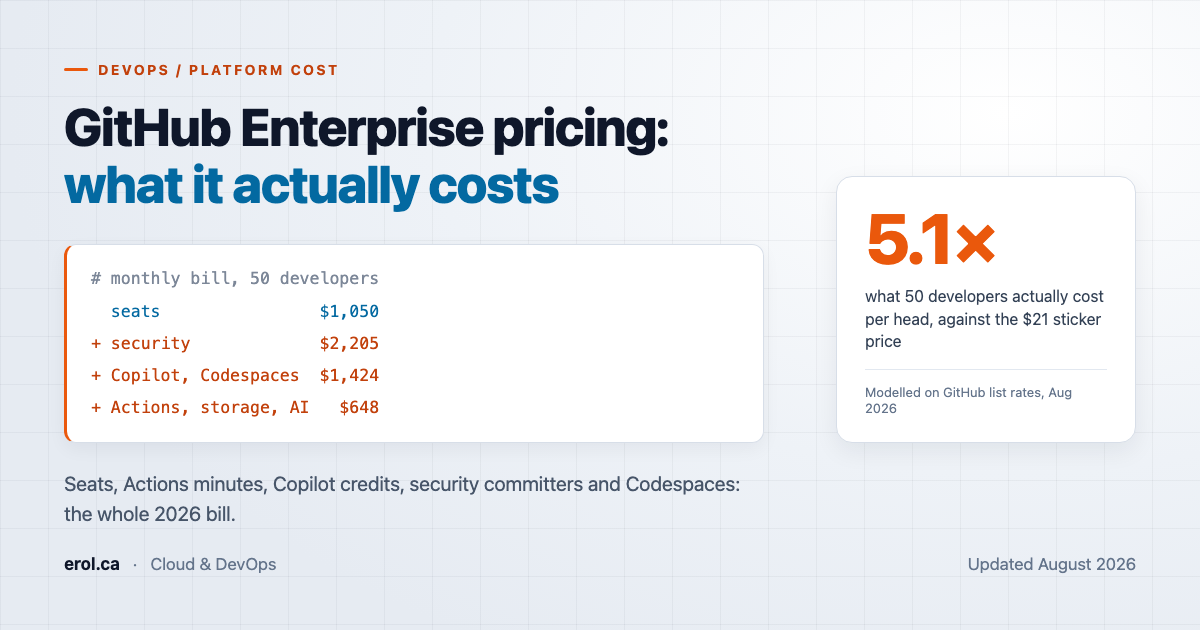
Around $5,300 a month, or $106 per developer, against a $21 sticker.
Here is the model. Every rate below is GitHub's published list price. Every volume is an assumption chosen to look like an ordinary mid-sized engineering organisation, and your volumes will differ. The point is the shape of the bill, not the total.
Assumptions: 50 developers on GitHub Enterprise Cloud, 45 of them active committers, 120,000 Linux two-core Actions minutes a month, 200 GB of shared storage, both security products enabled, and AI credit consumption 20% above the standard pooled allowance.
For Codespaces, 20 developers each use a four-core machine for 60 machine-hours a month, with 600 GB of storage between them, billed at $0.36 per hour and $0.07 per GB-month (GitHub Docs). That is 240 core-hours per developer, against the 120 core-hours a free personal account gets. One AI credit is $0.01 (GitHub Docs).
| Line item | Calculation | Monthly |
|---|---|---|
| Security (Secret Protection + Code Security) | 45 committers x $49 | $2,205.00 |
| GitHub Enterprise seats | 50 x $21 | $1,050.00 |
| Copilot Business | 50 x $19 | $950.00 |
| Codespaces | 1,200 hrs x $0.36 + 600 GB x $0.07 | $474.00 |
| Actions overage | 70,000 min x $0.006 | $420.00 |
| AI credits over allowance | 19,000 credits x $0.01 | $190.00 |
| Shared storage overage | 150 GB x $0.25 | $37.50 |
| Total | $5,326.50 | |
| Per developer | $106.53 |
Two things stand out. The security add-on alone is more than twice the platform seat cost, which reverses most people's mental model of what GitHub charges for. And the two genuinely unpredictable lines, Actions and AI credits, are together only about 11% of the bill in a steady month. The volatile costs get the attention; the fixed per-person add-ons are what actually set the number.
At $106.53 per developer against a $21 list seat, this organisation pays 5.1 times the sticker price. The seat is not wrong about what it covers; it simply covers far less of the invoice than its position in the price list implies.
Where do the bills surprise people?
Ten things catch people out most often. They fall into four groups: changes still landing, defaults that spend on your behalf, meters that do not behave the way you expect, and seats you are paying for without realising.
The habit that catches all of them is the one that keeps cloud bills predictable, and it is the same discipline I described in AWS cloud financial management for FinOps: instrument before you expand, and read one full billing cycle before you extrapolate.
The changes landing between now and 1 October
The Copilot credit allowance drops on 1 September 2026. When Copilot moved to usage-based billing on 1 June, existing Business and Enterprise customers received a transitional allowance for exactly three months. GitHub's documentation dates the window precisely: "existing Copilot Business and Copilot Enterprise customers receive a higher amount of included AI credits for the first three months of usage-based billing (June 1 – September 1, 2026)", after which "included usage returns to the standard amounts" (GitHub Docs). Business falls from $30 of included credits to $19, and Enterprise from $70 to $39 (GitHub Blog).
Nothing about the price changes. The included usage falls by 37% on Business and 44% on Enterprise. In the model above, that is the difference between an overage of nothing and an overage of $190: 114,000 credits sit comfortably inside a promotional pool of 150,000 and $190 outside a standard pool of 95,000. Anyone forecasting September from an August invoice will be wrong in the same direction.
One feature can bill on two meters at once. Since 1 June 2026, Copilot code review consumes GitHub Actions minutes in addition to AI credits on private repositories (GitHub Changelog, 1 June 2026).
That matters more from 28 September 2026, when the default review effort level changes from Lite to Balanced. Balanced consumes more of both meters, and the change applies to every repository and organisation still set to Default. If you followed the advice in my earlier walkthrough of setting up Copilot code review on every pull request and left the effort level at Lite implicitly rather than explicitly, GitHub is clear that you must "explicitly select Lite" before that date to keep it (GitHub Changelog, 28 August 2026).
Copilot seats become prepaid on 1 October 2026. GitHub has announced that from that date, existing Business and Enterprise customers paying by card or PayPal will see "all Copilot Business and Copilot Enterprise seats assigned incur an upfront charge" at the start of each billing cycle, and included usage "may be prorated across the month to align with the seat cost proration". Revoking a seat "does not result in a prorated refund" (GitHub Changelog, 28 August 2026). Prices are unchanged, but the cash-flow shape is not, and unused assigned seats become a strictly worse deal than they are today.
Defaults that spend money for you
Overage is switched on by default. This is the one to check today. GitHub's documentation states plainly that "additional usage is enabled by default for organizations and enterprises" and that preventing it requires an administrator to "explicitly disable the AI credits paid usage policy" in AI Controls settings (GitHub Docs). Spending past your allowance is the default behaviour, not an opt-in.
Budgets are weaker than they sound. They do not apply retroactively: a budget "applies only to metered usage from the date of its creation onwards", so creating one mid-month does not capture what you have already spent. And for licence-based products, "setting a budget does not prevent usage over the budget amount but does provide alerts" (GitHub Docs). A budget can stop metered spend. It cannot stop seat growth.
Meters that do not behave the way you expect
Larger runners forfeit your entire included allowance. Two sentences from the runner pricing documentation deserve to be pinned above every workflow file: "Included minutes cannot be used for larger runners" and "the larger runners are not free for public repositories" (GitHub Docs). A team that switches to 16-core runners for speed moves those jobs from covered-by-allowance to $0.042 a minute in one commit. On a public repository, where standard runners cost nothing at all, the same change goes from free to billed.
One piece of context on why the free tier matters less than it looks. GitHub's own Octoverse data shows private repositories growing faster than public ones, 33% year on year against 19%, with 81.5% of all contributions happening in private repositories (GitHub Octoverse 2025, covering 1 September 2024 to 31 August 2025). Standard runners are free only on public repositories, which is where under a fifth of contributions happen. The free tier does not reach most of the work.
Minutes round up per job. GitHub "rounds the minutes and partial minutes each job uses up to the nearest whole minute" (GitHub Docs). A matrix of 60 twelve-second jobs bills as 60 minutes, not 12. Fan-out is where this bites, and it is invisible on a per-job view of your usage.
Codespaces gives organisations less than it gives individuals. GitHub states flatly that "GitHub plans for organizations and enterprises do not include a free quota for GitHub Codespaces", while a free personal account gets 120 core-hours of compute and 15 GB-month of storage, and GitHub Pro gets 180 core-hours and 20 GB (GitHub Docs). An enterprise paying $21 a seat receives a smaller Codespaces entitlement than someone paying nothing.
That inversion is the single most counterintuitive line in GitHub billing, and it is easy to walk into. Codespaces is a per-repository setting a developer can enable, the machine type defaults upward on larger repositories, and a four-core codespace left running bills at $0.36 an hour whether or not anyone is typing in it (GitHub Docs). In the model above, 20 developers using Codespaces moderately cost $474 a month, more than the entire Actions overage. Set a machine-type policy at the organisation level and tighten the idle timeout, which defaults to 30 minutes, before you enable it rather than after the first invoice.
Seats you are paying for without realising
Dormant and pending users bill in full. Seats are consumed by all organisation members, by outside collaborators on private and internal repositories, by dormant users, and by pending invitations that nobody has accepted (GitHub Docs). Inviting an outside collaborator by email address consumes a seat while the invitation sits unanswered; inviting by username does not. That is a small, free saving available to anyone who onboards contractors regularly.
The 90-day committer window reactivates people you forgot about. For security billing, "a committer is considered active if one of their commits has been pushed to the repository within the last 90 days, regardless of when it was originally authored" (GitHub Docs). That last clause is the trap. A repository migration, a rebase, or a squash-merge re-pushes old commits and can reactivate committers who left the company years ago, at $49 each. Bot accounts are excluded, so at least automation does not inflate the count.
When is Team enough, and when do you need Enterprise?
Team is enough more often than it used to be, because the security products no longer require Enterprise. Since 1 April 2025, Team customers can buy Secret Protection and Code Security on a metered, pay-as-you-go basis (GitHub Changelog, 4 March 2025). That removed the single most common reason to upgrade.
What remains genuinely Enterprise-only is identity, governance, and scale of allowance:
| Signal | Plan |
|---|---|
| You need SAML single sign-on or SCIM provisioning enforced across all repositories | Enterprise |
| You need enterprise-level policies and audit data spanning multiple organisations | Enterprise |
| You need GitHub Enterprise Server, on your own infrastructure or in your own cloud account | Enterprise |
| You burn well past 3,000 Actions minutes a month | Enterprise, on allowance arithmetic alone |
| You want advanced security scanning and nothing else from the tier above | Team, plus the metered security SKUs |
| You are under 20 developers with modest CI and no regulatory driver | Team |
The allowance arithmetic is worth doing explicitly rather than by instinct. The gap between Team and Enterprise is $17 per user per month, which for 50 people is $850. That buys 47,000 additional included Actions minutes, worth $282 at the standard Linux rate, plus 48 GB of storage worth $12. On minutes and storage alone, Enterprise does not pay for itself at that headcount: you upgrade for SSO, governance, and Server, and the allowances are a partial rebate rather than the reason.
Run the numbers against your actual consumption before you renew, the same way you would size anything else against measured demand rather than a vendor tier chart. The AWS Well-Architected cost optimisation pillar frames the general version of this well: match supply to measured demand, then review on a schedule.
Frequently Asked Questions
Does GitHub Enterprise include GitHub Copilot?
No. No GitHub Enterprise plan bundles any Copilot tier. Copilot Business is $19 per user per month and Copilot Enterprise is $39 per user per month, both charged on top of the platform seat (GitHub Blog). A GitHub Enterprise seat with Copilot Enterprise attached costs $60 per user per month before any metered usage.
Do dormant users still consume a paid seat?
Yes. Dormant users consume a licence, as do all organisation members, outside collaborators on private and internal repositories, and pending invitations that have not been accepted (GitHub Docs). Nothing deprovisions automatically. A quarterly review of dormant accounts is the highest-yield cost exercise available on GitHub, because every seat removed is a full-rate saving.
Are GitHub Actions free on public repositories?
On standard GitHub-hosted runners, yes, and GitHub confirmed that "runner usage in public repositories will remain free" alongside the January 2026 price cut (GitHub Changelog, 16 December 2025). The exception is larger runners, which "are not free for public repositories" (GitHub Docs). Switching a public repository to larger runners moves it from free to fully billed.
Can a budget stop me from overspending?
Only on metered products, and only from the moment you create it. Budgets apply "only to metered usage from the date of its creation onwards", and for licence-based products a budget "does not prevent usage over the budget amount but does provide alerts" (GitHub Docs). Because additional AI credit usage is enabled by default for organisations and enterprises, a budget is something you must actively configure rather than a protection you already have.
Is GitHub Enterprise Server cheaper than Enterprise Cloud?
Neither is cheaper, because they are the same plan. The Enterprise plan entitles you to both, and a user "only consumes one license, no matter how many GitHub Enterprise Server instances the user uses, or how many organizations the user is a member of" on Cloud (GitHub Docs). The cost risk is failing to synchronise licence usage between deployments, which causes the same person to be billed twice.
What to do before your next invoice
The headline number is that the seat is roughly a fifth of what GitHub actually charges a mid-sized engineering organisation. The rest is add-ons priced per person on a different basis, plus meters that run whether or not anyone is watching them.
Four things are worth doing this week, in ascending order of effort:
- Check whether additional AI credit usage is enabled in your organisation's AI Controls settings. It is on by default.
- Explicitly select Lite as your Copilot code review effort level if that is what you want, before the default flips to Balanced on 28 September.
- Audit dormant seats and pending invitations. Both bill at full rate, and neither expires on its own.
- Re-forecast September before it starts. The transitional Copilot credits end on 1 September, and your August invoice is not a guide to what follows.
Then read one complete billing cycle before drawing any conclusions. Every number in this article is a list rate; the only figures that matter are the ones on your own usage page.
Erol Kavas is a cloud and DevOps engineer working on AWS, Azure and GitHub platform engineering. Background, certifications and contact details are on the about page; if you are working through a renewal or a plan change, I am glad to compare notes.
If you find a rate that has moved since 29 August 2026, tell me and I will correct the article and note the change.
